Why I built my own static site generator
Since the beginning of this website, I’ve always used some kind of static site generator (SSG). I simply REFUSE to write HTML manually.
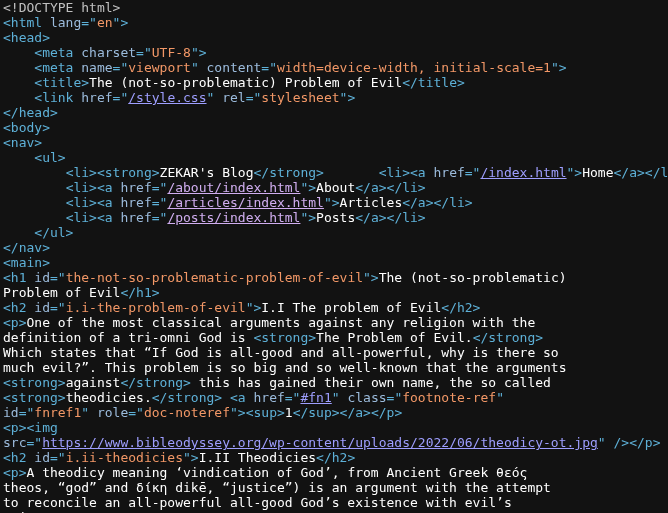
Not only that, but each time I write something I would have to update the index with the corresponding date and keep track of everything… Such a pain. That’s why SSG were invented in the first place, I can write a post in a simple markup format (like markdown), and have it converted and structured automatically to HTML.
Using Hugo
Like everyone else, I started out with Hugo, and I really hated it. I started out watching Luke Smith’s tutorials on Hugo (Is it only me that thinks using hugo is completely out of character for Luke Smith?). After a few iterations I started to think it was overly complicated… shortcodes? archetypes? it was too muchy. For me, that felt like the only choice so I stuck with it.
Honestly, I’d much rather use Hugo than a bloated node framework like react or vue… or whatever the hell kids nowadays are using. But still, it’s VERY complex, it has every feature in the world, making it feel bloated. Which is precisely the OPPOSITE of what good software is.
Hugo uses Go templates, which I find unnecessarily hard to read. You need to configure Hugo with a toml file, archetypes, layouts, modules and a lot of things. Just look at the number of directories in the setup I mentioned earlier.
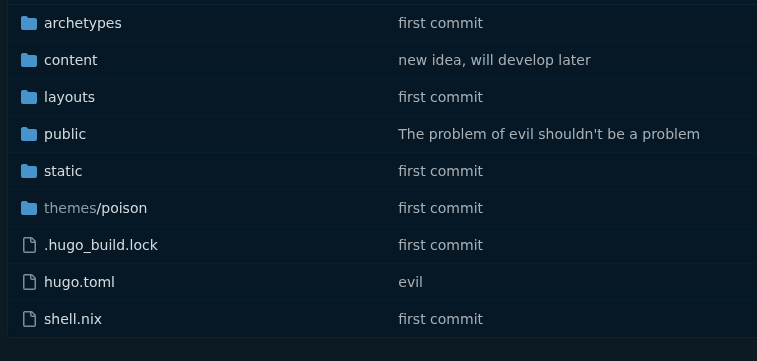
What are archetypes? What are layouts? No idea. I could search for it, but really, I didn’t have the need for that. Features you don’t use have a name: bloat
Using staw
I don’t know why I didn’t search for alternatives earlier. But when I stumbled upon a site that said was “staw powered” (specifically sta.li) and it piqued my interest. It was a minimal static site generator written in go by none other than Anselm R. Garbe, the mind behind suckless.org.
Don’t get me wrong, I think staw is an amazing piece of software. But it didn’t exactly generate what I was looking for. I tried to hack on it for a while but I wasn’t completely satisfied with the result. By the end it was almost unrecognizable (Ship of Theseus ts). I need an RSS/Atom feed to be happy, and a bit more structure in my site. Also… I don’t have multiple sites lol.
The biggest problem I had with staw is that it’s written in Go. Nothing against Go, just that I’m not particularly prolific in it. So I always relied on an LLM to help me out to add and remove features. Undoubtedly, this resulted in a mess of a codebase which made maintaining it kind of a pain. Also, it had a weird template lol.
Creating my own
“If you want it done right, you should just do it yourself”
I thought about making my own static site generator. Why would I? probably a lot of people had already done this and there is a bajillion SSG out there. Surely one does what I want. That’s right, but the main problem would be that I didn’t write it. Sounds narcissistic, I know. But if I wrote the actual program, I would be an expert on how it works, how to add new features and how it works internally.
Take a step back and think for a moment about what does a SSG actually do; transform text. It transforms from Markdown into HTML. And there are already several tools that accomplish this task, notoriously pandoc. I use pandoc for a lot of things (mostly converting markdown to pdf for school work) so I was already familiar on how it worked. Pandoc is “a universal document converter,” so converting Markdown to HTML would be normal work for it.
Pandoc would convert .md files into html. I just need to generate lists for indexes, generate an rss feed with the html content, structure the site. Sounds like a job for a shell script. (Specifically a posix-compliant one)
My requirements were simple enough
- Static pages (makes hosting way easier)
- Low resource usage (easily accomplished by writing a simple template and simple styling.)
- Readable in tools like
w3m(Just minimize javascript lol) - RSS/Atom feed (EVERYTHING should provide an RSS feed. Non-negotiable)
- A general index with all pages
- Subdirectories with their own indexes (for article/post separation)
- Dates (my website went way too long without dates)
Most of them are self-explanatory, here are some interesting challenges I solved though.
Feed
You can find the generated feed at atom.xml
What I did was just initialize it with some content and then add every entry for each page. The hardest part was definitely following the very strict standard for a valid atom feed.
cat <<EOF >"$FEED"
<feed xmlns="http://www.w3.org/2005/Atom">
<title>$SITE_TITLE</title>
<link href="$SITE_URL/atom.xml" rel="self" />
<link href="$SITE_URL/" />
<updated>$(date --iso=seconds)</updated>
<author>
<name>$(git config user.name)</name>
</author>
<id>$SITE_URL/</id>
EOF
# This gets executed for each page
append_to_feed() {
raw_html="$1"
html_path="$2"
title="$3"
date="$4"
#safe_html=$(xml_escape "$raw_html")
title=$(printf "%s\n" "$title" | sed 's/&/\&/g; s/</\</g; s/>/\>/g;')
safe_html=$(printf "%s\n" "$raw_html" | sed 's/&/\&/g; s/</\</g; s/>/\>/g;')
# Append entry to the feed
cat <<EOF >>"$FEED"
<entry>
<title>$title</title>
<link href="$SITE_URL/$html_path" />
<id>$SITE_URL/$html_path</id>
<updated>$date</updated>
<content type="html">$safe_html</content>
</entry>
EOF
}Indexes
I spent a lot of time thinking about how to implement the multiple indexes. My first thought was to, for each index, scan the whole directory for pages, maybe not the best idea, since I will be scanning every file TWICE (for the subdir and the main index).
Then I thought: maybe each subdirectory could maintain its own list
and for the main one merge them all. Well, that’s inefficient since I’ll
need to sort it for each subdir, then sort it again after merging them.
Not ideal. Also, how could I store different lists if I don’t already
know how many list I’ll need? temp files? using eval for
variable variable names?
I came up with a realization. I can just, for each file I process,
add it to the global list, then, when rendering the individual indexes
grep for the pattern "href=\"/$dir_name/". This is what I
came up with
append_to_list() {
link_name="$1"
title="$2"
date="$3"
PAGES_LIST="$(
printf '%s' "$PAGES_LIST"
printf '%s — <a href="/%s">%s</a><br/>\n' "$date" "${link_name%.md}.html" "$title"
)
"
# This newline is important, since subshells don't parse trailing newlines, I can't add it inside the subshell.
# Technically would work without this, but I like pretty HTML if possible.
}
# [...]
for d in "$INPUT"/*/; do
[ -d "$d" ] || continue
dir_name=$(basename "$d")
mkdir -p "$OUTPUT/$dir_name"
sub_html="$([ -s "$d/index.md" ] && pandoc $PANDOC_FLAGS "$d/index.md" || echo "<h1>$(pretty_name "$dir_name") Index</h1>")"
sub_list=$(printf '%s\n' "$PAGES_LIST" | grep "href=\"/$dir_name/")
generate_html \
"$(printf '%s\n\n%s' "$sub_html" "$sub_list")" \
"$OUTPUT/$dir_name/index.html" \
"$(pretty_name "$dir_name") Index" \
"" 1
doneThe final result
If you wanna take a closer look, here’s the code
Usage
You’re EXPECTED to edit the source code, at least for changing the name and URL of your page. If you’re unfamiliar with shell (you should learn!), it’s very intuitive to figure out how to change a couple of variables.
You can have any number of subdirectories (you can nest them if you want, but they won’t appear in the navigation bar). In each subdirectory (and the root), you can add an index.md if you want, it’s not required.
You’re EXPECTED to use git. If you’re not (what are you even doing, man?), the date-generation thingy won’t work (since it uses the date of commits of a specific file to do it)
Any non-markdown files will be copied verbatim (images, documents, stylesheets, etc…)
A template.html is expected in the same directory as the script, with standard html boilerplate
<!DOCTYPE html>
<html lang="en">
<head>
    <meta charset="UTF-8">
    <meta name="viewport" content="width=device-width, initial-scale=1">
    <title>{{TITLE}}</title>
    <link href="/style.css" rel="stylesheet">
    <link href="/syntax.css" rel="stylesheet">
</head>
<body>
The script will make sure to close </body> and
</html>
Other than that I think everything is pretty self-explanatory